Best DynamoDB GUI Client - Top 5 Tools Compared (2026)
Choosing the right DynamoDB GUI client can dramatically improve your development workflow. This guide compares the top 5 tools available in 2026, covering features, pricing, performance, and use cases.
Quick Comparison Table
| Tool | Price | Platform | Best For | Open Source |
|---|---|---|---|---|
| DocKit | Free | Mac, Windows, Linux | Teams, cost-conscious devs | ✅ |
| Dynobase | $12-30/mo | Mac, Windows, Linux | Individuals, teams with budget | ❌ |
| NoSQL Workbench | Free | Mac, Windows, Linux | AWS-centric workflows | ❌ |
| AWS Console | Free* | Browser | Quick lookups, managed by AWS | ❌ |
| DynamoDB Admin | Free | Browser (local) | Local development only | ✅ |
*AWS Console is free to use, but requires AWS account (with potential data transfer costs)
1. DocKit - Best Overall for Teams
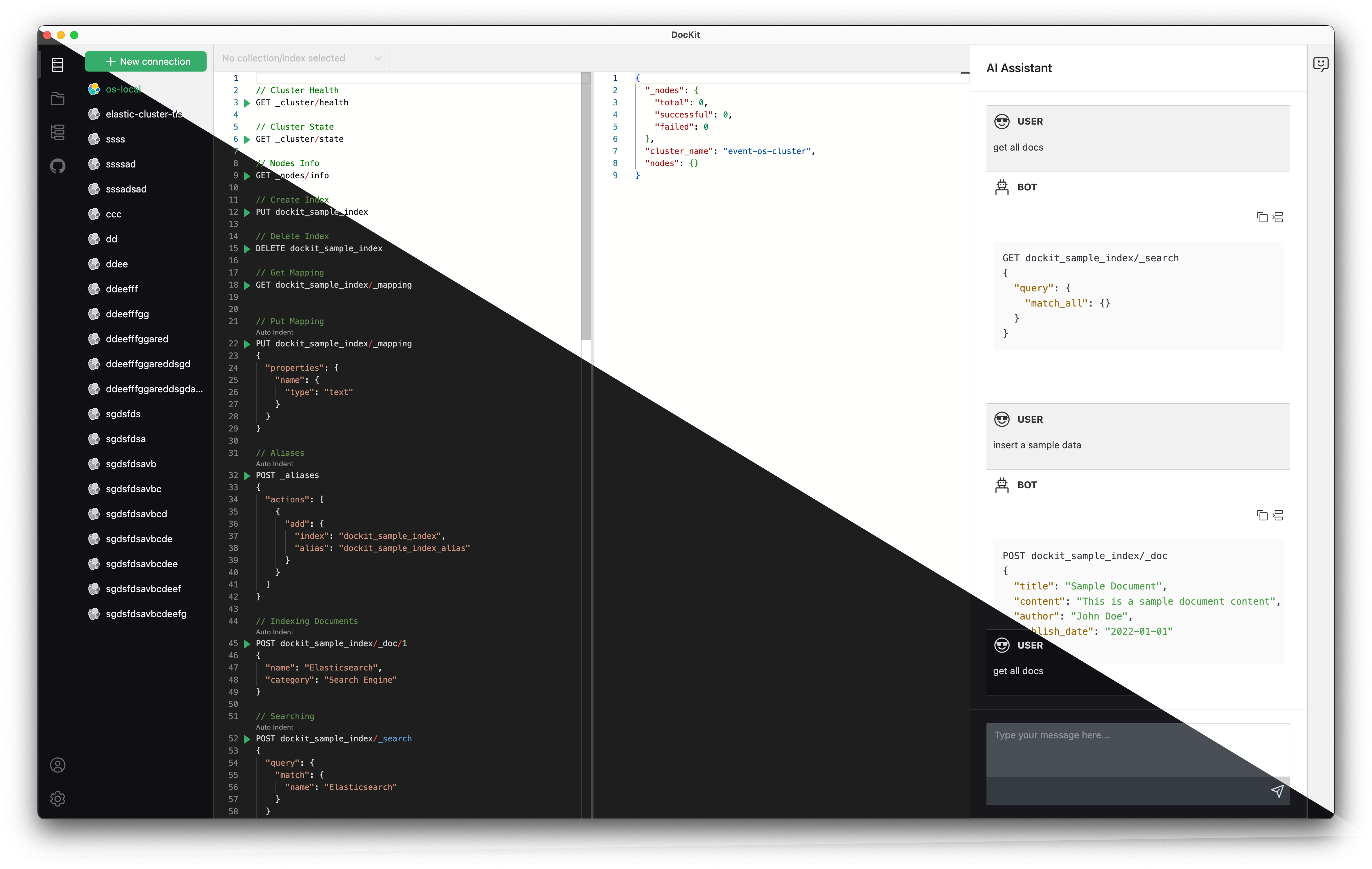
Overview
DocKit is a free, open-source desktop client that supports DynamoDB, Elasticsearch, and OpenSearch. Built with Tauri/Rust for performance and security.
Key Features
- ✅ PartiQL Editor: Full syntax highlighting and auto-completion
- ✅ Visual Query Builder: No code required for basic queries
- ✅ Multi-Tab Support: Work on multiple queries simultaneously
- ✅ Local-First: All queries stored locally (privacy-focused)
- ✅ DynamoDB Local Support: Offline development
- ✅ AI Assistant: Generate queries using natural language
- ✅ Export Options: JSON, CSV, and custom formats
Pricing
Free - Apache 2.0 open source license
Performance
- Startup Time: < 2 seconds
- Memory Usage: 100-200 MB
- Large Result Sets: Handles 100K+ items efficiently
Pros
- ✅ Completely free with no limitations
- ✅ Multi-database support (DynamoDB + Elasticsearch + OpenSearch)
- ✅ Fast and lightweight (native Rust/Tauri)
- ✅ Open source (auditable, customizable)
- ✅ Local-first (works offline, no cloud sync)
- ✅ Active development and community
Cons
- ❌ Newer project (less mature than Dynobase)
- ❌ No built-in team collaboration (use Git for query sharing)
- ❌ UI is functional but less polished than commercial tools
Best For
- Cost-Conscious Teams: Save $720-1,800/year vs. Dynobase
- Multi-Database Users: Also manage Elasticsearch/OpenSearch
- Privacy-Focused Organizations: Local-only data storage
- Open Source Advocates: Full transparency and customization
Get Started
👉 Download DocKit | Read DynamoDB GUI Guide
2. Dynobase - Best Premium Option
Overview
Dynobase is a commercial DynamoDB-focused GUI client with excellent polish and dedicated support.
Key Features
- ✅ Beautiful UI: Most polished interface of any tool
- ✅ Query Builder: Intuitive visual query construction
- ✅ Cloud Sync: Queries synced across devices
- ✅ Team Collaboration: Share queries and connections
- ✅ Export/Import: Multiple format support
- ✅ DynamoDB Streams: Monitor table changes
Pricing
- Professional: $12/month (1 user)
- Team: $30/month (unlimited users, single workspace)
Performance
- Startup Time: 3-5 seconds
- Memory Usage: 300-500 MB (Electron-based)
- Large Result Sets: Good performance up to 50K items
Pros
- ✅ Most polished and intuitive UI
- ✅ Excellent documentation and tutorials
- ✅ Responsive customer support
- ✅ Cloud sync for team collaboration
- ✅ Regular updates and new features
Cons
- ❌ Subscription cost ($144-360/year per user)
- ❌ Cloud sync raises privacy concerns for some
- ❌ DynamoDB-only (no Elasticsearch/OpenSearch)
- ❌ Larger application size (Electron overhead)
Best For
- Individual Developers: Willing to pay for polish
- Small Teams: With budget for productivity tools
- DynamoDB-Only Workflows: Don't need other databases
Learn More
3. AWS NoSQL Workbench - Best for AWS Ecosystem
Overview
Official AWS tool for DynamoDB data modeling and query development.
Key Features
- ✅ Data Modeling: Visual schema designer
- ✅ Free: No cost, no subscription
- ✅ AWS Integration: Deep integration with AWS services
- ✅ Sample Data: Generate realistic test data
- ✅ Query Visualizer: See query execution plans
Pricing
Free
Performance
- Startup Time: 5-10 seconds
- Memory Usage: 400-600 MB (Electron-based)
- Large Result Sets: Moderate performance (< 25K items)
Pros
- ✅ Official AWS tool (always up-to-date with API changes)
- ✅ Excellent for data modeling and schema design
- ✅ Free with no limitations
- ✅ Built-in sample data generators
Cons
- ❌ Heavy and slow (Electron-based)
- ❌ Clunky UI compared to alternatives
- ❌ Limited query editing features
- ❌ No multi-table queries
- ❌ DynamoDB-only
Best For
- Data Modelers: Schema design is primary use case
- AWS-Heavy Teams: Already using many AWS tools
- Beginners: Learning DynamoDB concepts
4. AWS DynamoDB Console - Best for Quick Lookups
Overview
Web-based interface built into AWS Management Console.
Key Features
- ✅ Zero Installation: Access from any browser
- ✅ AWS Native: Integrated with IAM, CloudWatch, etc.
- ✅ Table Management: Create/modify tables
- ✅ Built-in Monitoring: CloudWatch metrics integration
Pricing
Free (but requires AWS account and may incur data transfer costs)
Performance
- Page Load: 3-10 seconds
- Memory Usage: 400-800 MB (browser tab)
- Large Result Sets: Limited to ~1,000 items per page
Pros
- ✅ No installation required
- ✅ Always up-to-date
- ✅ Integrated with AWS services
- ✅ Table creation and management
Cons
- ❌ Slow and browser-dependent
- ❌ No query persistence (lost on tab close)
- ❌ Limited to 1,000 items per view
- ❌ Requires internet connection
- ❌ Clunky for regular use
Best For
- Occasional Users: Infrequent DynamoDB access
- Quick Lookups: One-off queries
- Table Management: Administrative tasks
5. DynamoDB Admin - Best for Local Development
Overview
Lightweight web UI for DynamoDB Local, running as a Node.js server.
Key Features
- ✅ DynamoDB Local: Designed for offline development
- ✅ Simple Interface: Basic CRUD operations
- ✅ Open Source: MIT licensed
- ✅ Lightweight: Minimal resource usage
Pricing
Free - Open source
Performance
- Startup Time: 2-3 seconds (local server)
- Memory Usage: 100-200 MB
- Large Result Sets: Limited to local database size
Pros
- ✅ Perfect for DynamoDB Local development
- ✅ Open source and customizable
- ✅ Very lightweight
- ✅ Easy to set up
Cons
- ❌ DynamoDB Local only (no AWS connections)
- ❌ Very basic feature set
- ❌ No query builder or advanced editor
- ❌ Limited UI polish
Best For
- Local Development: Offline testing with DynamoDB Local
- CI/CD Pipelines: Automated testing environments
- Minimalists: Need basic CRUD only
Feature Comparison Matrix
| Feature | DocKit | Dynobase | NoSQL Workbench | AWS Console | DynamoDB Admin |
|---|---|---|---|---|---|
| PartiQL Editor | ✅ Advanced | ✅ Advanced | ⚠️ Basic | ⚠️ Basic | ❌ |
| Query Builder | ✅ | ✅ | ✅ | ❌ | ❌ |
| Offline Mode | ✅ Full | ✅ Full | ✅ Full | ❌ | ✅ Local only |
| Multi-Tab Queries | ✅ | ✅ | ⚠️ Limited | ❌ | ❌ |
| Export to CSV | ✅ | ✅ | ✅ | ⚠️ Limited | ❌ |
| DynamoDB Local | ✅ | ✅ | ✅ | ❌ | ✅ Only |
| AI Assistant | ✅ | ❌ | ❌ | ❌ | ❌ |
| Multi-Database | ✅ ES/OS | ❌ | ❌ | ❌ | ❌ |
| Memory Usage | 100-200 MB | 300-500 MB | 400-600 MB | 400-800 MB | 100-200 MB |
| Open Source | ✅ | ❌ | ❌ | ❌ | ✅ |
Choosing the Right Tool
Decision Tree
Are you managing multiple database types (DynamoDB + Elasticsearch/OpenSearch)? → DocKit (multi-engine support)
Is your budget $0? → DocKit (free, full-featured) or NoSQL Workbench (data modeling focus)
Need the most polished UI and have budget? → Dynobase (best commercial option)
Only need quick lookups occasionally? → AWS Console (no installation)
Working exclusively with DynamoDB Local? → DynamoDB Admin (lightweight local-only)
Use Case Recommendations
Startups & Small Teams
Recommendation: DocKit
- Zero cost (critical for budget)
- Multi-database support (DynamoDB + OpenSearch for logs)
- Fast and lightweight
Enterprise Teams
Recommendation: DocKit or Dynobase
- DocKit if: Privacy/compliance concerns, multi-database needs, cost-sensitive
- Dynobase if: Budget available, DynamoDB-only, want premium support
Individual Developers
Recommendation: DocKit or Dynobase
- DocKit if: Budget-conscious, like open source, need flexibility
- Dynobase if: Willing to pay $12/month for polish
Data Architects
Recommendation: NoSQL Workbench
- Best for schema design and data modeling
- Use alongside DocKit for querying
Real User Scenarios
Scenario 1: Microservices Team (5 Developers)
Databases:
- DynamoDB (user data, sessions)
- OpenSearch (application logs)
Choice: DocKit
Why:
- Multi-database support saves tool switching
- $0 cost vs. $720/year for Dynobase Team
- Local-first approach fits security requirements
- Open source allows internal customization
Scenario 2: Solo Developer (Side Project)
Database:
- DynamoDB only
Choice: DocKit or Dynobase
Why DocKit:
- Free (important for side project)
- Open source (learn from code)
- Future-proof (can add Elasticsearch later)
Why Dynobase:
- Polished UX saves time
- $12/month affordable for serious project
- Great documentation
Scenario 3: Enterprise SRE Team
Databases:
- Production DynamoDB
- Compliance requirements
Choice: DocKit
Why:
- Local-first (audit-friendly)
- Open source (security review required)
- No cloud sync (data residency)
- Multi-database (also manage OpenSearch)
Performance Benchmarks
Tested on MacBook Pro M2, querying table with 100K items:
| Operation | DocKit | Dynobase | NoSQL Workbench | AWS Console |
|---|---|---|---|---|
| App Launch | 1.2s | 3.1s | 8.7s | 4.2s (page load) |
| Connect to DB | 0.3s | 0.4s | 0.8s | 1.2s |
| Query 10K items | 1.1s | 1.3s | 2.4s | 3.8s (limited to 1K) |
| Export to CSV | 2.3s | 2.7s | 4.1s | N/A |
Final Recommendation
🥇 Best Overall: DocKit
- Winner for: Teams, multi-database users, cost-conscious developers
- Strengths: Free, fast, multi-engine, open source
- Get Started: Download DocKit
🥈 Best Premium: Dynobase
- Winner for: Individuals with budget, DynamoDB-only teams
- Strengths: Polished UI, great support, cloud sync
- Alternative: Compare with DocKit
🥉 Best for Modeling: NoSQL Workbench
- Winner for: Data architects, schema designers
- Strengths: Official AWS tool, data modeling features
- Use With: DocKit for querying
Related Resources
- DynamoDB GUI Client Guide - DocKit DynamoDB features
- Dynobase Alternative - Detailed Dynobase vs. DocKit
- DynamoDB PartiQL Editor - PartiQL guide
- Local-First Database Client - Privacy benefits
- Download DocKit - Get started free
Frequently Asked Questions
Can I use multiple tools?
Yes! Many developers use:
- DocKit for daily querying
- NoSQL Workbench for schema design
- AWS Console for table management
Which tool is fastest?
DocKit and DynamoDB Admin (native/lightweight) are fastest. Electron-based tools (Dynobase, NoSQL Workbench) are slower but still acceptable.
Which tool is most secure?
DocKit and DynamoDB Admin (both open source, local-first) are most auditable. Cloud-sync tools (Dynobase) require trust in vendor.
Can I try before committing?
Yes! DocKit and DynamoDB Admin are free. Dynobase offers a 14-day trial.
Last updated: January 2026